

You’re not alone if terms like domain, hosting, and website confuse you.
Most beginners mix them up. Some believe they’re all the same thing. Others buy one and then wonder why nothing works.
By the end of this guide, you’ll clearly understand the difference, how they work together, and what you actually need to get your website online. No jargon. No confusion.
In this post, I’ll explain domain vs hosting vs website using simple language, real-world examples, and practical tips so you don’t get it wrong at the beginning.
What Is a Domain Name?
Your domain name is your website’s address on the internet.
It’s what people type into their browser to find you.
Examples:
- google.com
- hostcheapin.com
- yourbusiness.in
Without a domain, people won’t be able to find your site.
Simple explanation
Think of a domain like your home address.
It tells people where to go, but it doesn’t mean there’s a house built there yet.
What a domain looks like
A domain usually has two parts:
- Name: hostcheapin
- Extension: .com, .net, .org, .in
Together, they form a complete domain name.
What you need to know about domains
- You rent a domain; you don’t own it forever
- It needs to be renewed every year
- One domain can be connected to any hosting provider
- You can change your hosting without changing your domain
If you want to understand the registration process in detail, read
👉 What details are required for domain registration
https://hostcheapin.com/what-details-are-required-for-domain-registration/
What Is Web Hosting?
Web hosting is where your website files are stored.
It’s a physical server that stays online 24/7 so visitors can access your site at any time.
Simple explanation
If your domain is the address, hosting is the house built at that address.
Without hosting:
- Pages won’t load
- Images won’t appear
- Your website won’t exist online
What hosting actually stores
- Website files
- Images and videos
- Databases
- Emails (in some hosting plans)
Common types of hosting
- Shared hosting
- VPS hosting
- Cloud hosting
- Dedicated hosting
- WordPress hosting
Each type is designed for different needs, budgets, and traffic levels.
To learn more about beginner-friendly hosting, see
👉 What is shared hosting
https://hostcheapin.com/what-is-shared-hosting/
What Is a Website?
A website is the actual content people see and interact with.
This includes:
- Pages (Home, About, Contact)
- Text and images
- Forms
- Blog posts
- Online stores
Simple explanation
The website is what’s inside the house:
- Furniture
- Design
- Rooms
- Decorations
Websites are built using:
- HTML, CSS, JavaScript
or
- CMS platforms like WordPress
Domain vs Hosting vs Website (Comparison)
| Feature | Domain | Hosting | Website |
|---|---|---|---|
| Purpose | Address | Storage | Content |
| Seen by users | Yes | No | Yes |
| Must be renewed | Yes | Yes | No |
| Can exist alone | Yes | Yes | No |
| Example | hostcheapin.com | Server space | Pages & content |
How Domain, Hosting, and Website Are Related
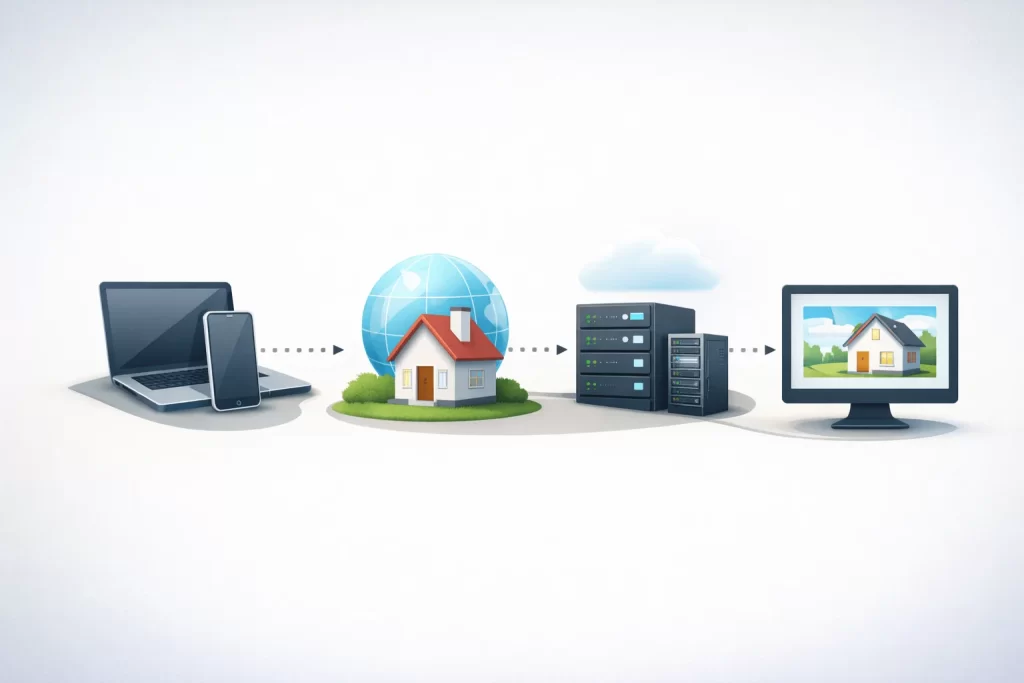
Here’s what happens when someone visits your site:
- A user types your domain name
- The domain points to your hosting server
- The hosting server loads your website files
- The website appears in the browser
If even one of these elements is missing, your site won’t work properly.
For an official explanation of how domains work, ICANN explains it clearly:
👉 https://www.icann.org/resources/pages/domain-name-basics-2019-10-08-en
(This builds trust and E-E-A-T without sending traffic to competitors.)
Do You Need All Three?
Yes.
You need all three to run a website:
- Domain → to be found
- Hosting → to store files
- Website → to show content
Buying just one won’t put your site online.
Common Beginner Mistakes (Avoid These)
Buying hosting without a domain
Hosting alone won’t give you a website address.
Buying a domain and expecting a website
A domain doesn’t automatically create pages.
Mixing up WordPress with hosting
WordPress is software, not hosting.
Thinking free hosting is enough
Free hosting often includes:
- Ads
- Slow speeds
- No support
- Weak security
Can One Company Provide Domain, Hosting, and Website?
Yes, many companies offer all three.
But here’s a smart tip:
You can buy your domain and hosting separately and connect them easily.
This gives you:
- More control
- Easier switching
- Better pricing options
Which Should You Buy First?
Start with:
- Domain
- Hosting
- Website setup
This order avoids confusion and setup problems.
Real-Life Example
Imagine opening a restaurant:
- Domain = Restaurant address
- Hosting = Building
- Website = Menu, seating, staff, and branding
You need all three to run the business.
Final Thoughts
Understanding the difference between domain vs hosting vs website saves time, money, and frustration.
Once you know how they work together, building a website becomes much easier.
No technical stress. No wrong purchases.
If you’re just getting started, focus on:
- A clear domain name
- Reliable hosting
- A simple website setup
Everything else can come later.
FAQs
Is a domain the same as a website?
No. A domain is just the address, not the website itself.
Can I use one hosting plan for multiple websites?
Yes, if your hosting plan allows it.
Can I change hosting without changing my domain?
Yes, anytime.
Do I need hosting for WordPress?
Yes. WordPress needs hosting to work.